


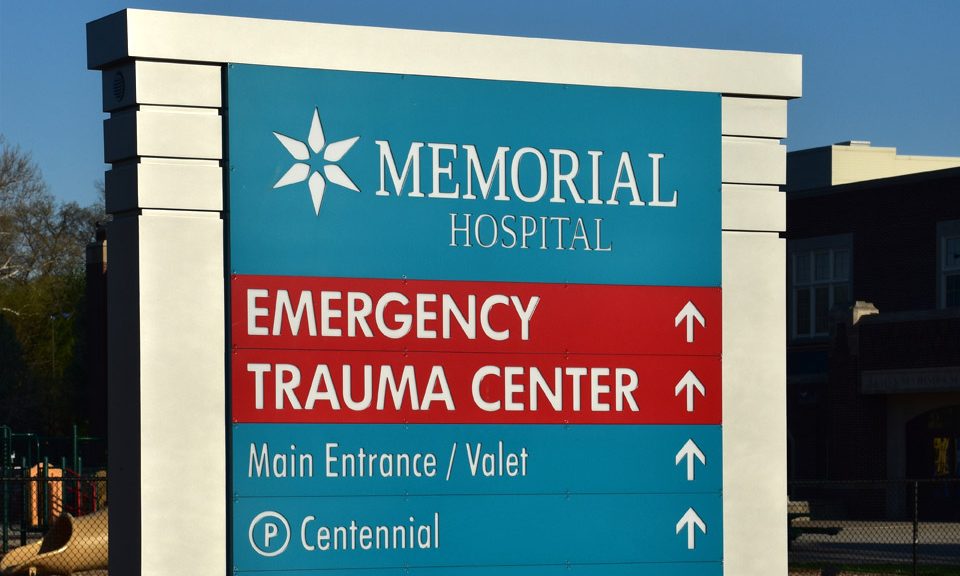
We’ve all been to a place that was unfamiliar and required you to rely on the signage to navigate through the space. Airports are a common one where the signage has to be so specific as to tell you which lane to be to get to different doors, terminals, and gates. Whether your experience in navigating an unfamiliar space was good or bad, it’s no secret that you need something to help guide you! That’s where effective wayfinding signage comes in.
Wayfinding systems in 2025 are more advanced than ever, blending technology, design, and user needs to improve navigation in complex spaces like hospitals, malls, and offices. These systems are no longer just static signs – they now include smart technologies, digital displays, and accessibility features to enhance user experience and efficiency. Here’s what you need to know:
- Smart Tech Integration: Systems now use AI, AR, and mobile apps for real-time updates and personalized navigation. For example, AR overlays directions on smartphone screens, while apps provide turn-by-turn guidance.
- Accessibility Standards: ADA-compliant designs ensure inclusivity with tactile signs, Braille, and high-contrast visuals. Over 70 million Americans with disabilities benefit from these designs, making them both ethical and financially impactful.
- Design Trends: Simplicity and clarity are key. Signs use sans-serif fonts, clear symbols, and color-coded zones for easy readability. Materials like wood and metal are popular for blending style with durability.
- Placement Essentials: Signs work best at decision points like intersections, elevators, and stairways. Proper height (48–60 inches) ensures visibility for all users.
- Digital Wayfinding: Interactive kiosks, QR codes, and dynamic displays provide instant updates and multilingual support. These tools are increasingly common in high-traffic areas like airports and malls.
- Business Impact: Effective signage boosts customer trust, brand perception, and efficiency. For instance, 79% of people associate good signage with high-quality products or services.
Wayfinding in 2025 is about more than directions – it’s about creating user-friendly, accessible, and tech-driven navigation systems that meet modern expectations.
Key Elements of Effective Signage
A well-designed signage plan isn’t just about looks—it’s about helping people move through a space with ease. Whether it’s a hospital, airport, office, or retail store, successful signage systems rely on a few key building blocks.
The Four Main Types of Wayfinding Signs
Most signage systems are made up of four primary types, each serving a specific purpose. You’ll find these in nearly every public or commercial space:
1. Directional Signs
These signs guide people from one place to another. You’ll see them at decision points—hallways, intersections, elevator lobbies, or parking decks. Examples include:
-
“Cafeteria ← | Emergency Exit →”
-
“Levels 2–4 ↑ | Level 1 ↓”
Effective directional signs use clear arrows, concise wording, and consistent visual style.
2. Identification Signs
These confirm that someone has reached the right location. They’re used for room numbers, department names, or floor levels, and are typically found on doors or at key entry points.
Think: “Radiology – Room 203” or “Conference Room A.” These signs often use bold fonts, high contrast, and prominent placement to stand out.
3. Informational Signs
These provide extra context or helpful details—like maps, room directories, operating hours, or emergency procedures. You’ll usually spot them in entry areas, lobbies, or places where people pause to read and orient themselves.
4. Regulatory Signs
These communicate rules or restrictions, helping ensure safety and compliance. Common examples include:
-
“No Smoking”
-
“Authorized Personnel Only”
-
“Please Wear a Mask”
They rely on standardized colors, icons, and bold wording to quickly get the message across.
While each of these types serves a different function, they all depend on smart placement to be truly effective.
Sign Placement Best Practices
Even the best-designed sign won’t help if people can’t see it when they need it. Strategic placement is essential for guiding people smoothly and confidently.
A general rule: Place signs at decision points—where someone needs to choose a direction. Think hallway intersections, stairwells, elevators, and doorways. If a sign is too early, it may be forgotten. Too late, and you’ve already missed your turn.
Height matters too. For wall-mounted signage, the ideal viewing height is typically between 48 and 60 inches from the ground. This range ensures visibility for both standing adults and individuals using wheelchairs.
High-traffic areas like lobbies, entrances, and main hallways are great spots for large maps, building directories, or welcome signage. These are places where people naturally pause, making them perfect for orientation or informational signs.
Also, consider how people move through the space—both direction and volume. For example:
-
In busy environments like airports, signage should be placed above the flow of traffic, where it won’t be blocked by crowds. Large, high-contrast fonts and hanging signs help travelers see directions from a distance.
-
In quieter, more intimate settings—like office corridors or hospital wings—eye-level wall signage works well. It falls right into a person’s natural line of sight and is easy to read up close.
By aligning sign types with thoughtful placement, you create a system that not only looks cohesive—but works exactly when and where people need it.
Why Signs Matter
Every sign does more than just sit on a wall or hang over a doorway. It plays an essential role in guiding people, providing information, and reinforcing your brand. Whether it’s pointing someone in the right direction or confirming they’ve arrived at the right place, signs help people move through spaces with ease.
Some signs direct traffic—literally—getting people from Point A to Point B. Others confirm locations, like department names or room numbers. Informational signs provide helpful context, and regulatory signs establish the rules to keep everyone safe and organized.
The key is presenting that information in a clear, thoughtful hierarchy. Big-picture messages—like major destinations—should stand out, while smaller details (like room labels or office hours) can be more subtle. That way, people get just the right amount of information without feeling overwhelmed.
And when your signs follow a consistent style—using similar fonts, colors, and layouts—they do more than guide. They reinforce your brand, creating a unified, professional feel across your space.
3 Essentials for Great Wayfinding Design in 2025
With attention spans now hovering around eight seconds or less, signs need to grab attention quickly—and deliver their message just as fast. The most effective designs for 2025 share three key traits:
1. Clarity Comes First
Great wayfinding signs are easy to read and easy to understand. Use clean, legible fonts like Helvetica or Arial that stay readable even from a distance. Stick to short, direct language. For instance, instead of writing:
“Please proceed to the elevator area on the east side of the building,”
just say:
“Elevators →”
In a fast-paced world, people don’t have time to overthink.
Icons and universal symbols—like arrows, restroom signs, elevators, and stairs—help bridge language barriers and reduce confusion. For maps and directories, keep the layout simple and avoid excessive detail. Less is more.
2. Smart Use of Color and Contrast
Color does more than make signs look good—it helps people process information quickly. Use color-coding to distinguish different areas or functions. For example, in a hospital:
-
Blue = Patient services
-
Green = Waiting or family areas
-
Red = Emergency or restricted zones
Contrast is just as critical. Make sure your text stands out from the background. A contrast ratio of at least 4.5:1 is recommended for readability. Here are a few examples:
| Background Color | Text Color | Contrast Ratio |
|---|---|---|
| White (#FFFFFF) | Black (#000000) | 21:1 |
| Light Gray (#F0F0F0) | Dark Gray (#2C2C2C) | 8.9:1 |
| Blue (#007BFF) | White (#FFFFFF) | 4.5:1 |
Avoid hard-to-read combos like red text on a green background, which can be difficult for many people to see clearly.
Visual hierarchy also matters. Important information—like department names or directional arrows—should be bold and prominent. Secondary info, such as room numbers or business hours, can take a back seat visually.
And don’t forget lighting. Check your signage under different lighting conditions. Reflective or illuminated materials can make signs easier to see in outdoor spaces or during evening hours.
“Good design is good business.”
– Thomas Watson Jr.
3. Blending Good Design with Brand Aesthetics
Design trends in 2025 are blending minimalism with a nostalgic touch. Think: sleek, simple shapes paired with vintage-inspired typography. This approach strips away distractions and keeps users focused on what matters.
There’s also a move toward natural-meets-modern materials. Signs that combine warm wood textures with cool metal finishes are popular in retail and hospitality spaces, where design is a key part of the experience.
Interactive signage is on the rise too. QR codes add layers of digital information. Braille and tactile elements make signage more inclusive. Emerging technologies like AI-driven displays, augmented reality, and voice-activated signs are starting to play a role—making navigation smarter and more intuitive.
Sustainability is another major influence. Eco-friendly materials like responsibly sourced wood or recycled metals are becoming standard. These options help reduce environmental impact without sacrificing durability or design.
Consider the brand’s aesthetics and values. How can you marry the design needs of a space with building up brand trust?
Improving Accessibility and Compliance
Designing inclusive signage is key to creating spaces that are easy to navigate for everyone. With roughly 25% of Americans living with a disability today, wayfinding systems need to address diverse needs. This not only helps avoid legal complications but also fosters an environment that welcomes all visitors.
ADA Standards and Universal Design
The Americans with Disabilities Act (ADA) outlines specific guidelines for signage to accommodate individuals with various abilities. While some signs, like outdoor displays or tall pylon signs, are exempt from these rules, indoor signs such as restroom markers, room identifiers, and directional signage must adhere to ADA standards.
You can learn more about ADA requirements for tactile signs, braille, signs for different settings, required symbols, and more at U.S. Access Board.
Here are some basic requirements to give you an idea of basic design elements that must achieved in ADA-compliant signs.
| Sign Type | Height Requirements | Text Requirements |
|---|---|---|
| Tactile Signs | 48–60 inches (lowest to highest) | ½–2 inches tall, all caps, sans serif |
| Visual Signs | 40 inches minimum | ⅝ inch minimum; upper and lower case acceptable |
| Parking Signs | 60 inches minimum (bottom edge) | High contrast, non-glare finish |
| Overhead Signs | 80 inches minimum clearance | Large fonts, high contrast |
Local building codes often supplement ADA standards, adding further requirements for installation.
Meeting Federal, State, and Local Regulations
In addition to ADA guidelines, federal, state, and local regulations often impose additional requirements for sign installation. Before starting any project, it’s critical to review these codes, as they may dictate specific materials, colors, or placement details.
For instance, building codes may require signs to meet standards for wind resistance, earthquake durability, or limits on how far they can protrude into walkways.
Collaborating with a professional sign company can simplify this process. These experts are familiar with local regulations and can guide you through the permitting and approval stages, which may take weeks or even months.
Regular updates to signage are necessary because compliance standards evolve over time. Staying informed about ADA changes and local code revisions ensures that your signage remains functional and compliant.
Digital Integration: The Future of Wayfinding
As wayfinding continues to evolve, digital integration is transforming how we navigate spaces by introducing real-time, interactive solutions. Static signs are being replaced with dynamic, responsive systems, reshaping navigation across various environments. It’s no surprise that the digital signage market is expected to hit $29.8 billion by 2025, as demand grows for smarter, more engaging tools in busy locations like airports, malls, and hospitals.
Interactive Digital Signage
Interactive digital displays are changing the game for wayfinding by offering users a more engaging and efficient experience. Touchscreen kiosks, for instance, act as self-service hubs, providing detailed maps, directories, and even promotional content. These systems are especially useful in high-traffic areas like malls, hotels, and hospitals, where they help reduce delays and streamline navigation.
Beyond basic navigation, these kiosks are equipped with features like multilingual support, making them ideal for tourist-heavy locations. Modern systems also incorporate gamified elements, such as challenges and rewards, to make navigation more engaging and memorable. For example, users might interact with touch menus or participate in quick surveys, adding a layer of fun to the experience.
But it’s not just about user engagement. These systems can track behavior and preferences, offering insights into traffic patterns and popular destinations. Emerging technologies like motion sensors, gesture control, and transparent touchscreens are further enhancing the user experience, while also addressing the need for contactless interactions in a post-pandemic world.
Building on these interactive features, smart technologies are taking wayfinding to the next level with real-time, personalized navigation.
Smart Technology Integration
By 2025, smart wayfinding systems will leverage advanced technologies like AI, IoT, BLE beacons, AR, and sophisticated mapping tools to provide tailored navigation experiences. These systems adapt to real-time conditions, offering updates and predictive capabilities that make navigating complex spaces seamless.
Unlike static signs, modern systems deliver live turn-by-turn directions, accounting for factors like flight delays, security line wait times, and crowd density. This ensures users always have the most up-to-date information at their fingertips. Airports are a great example of the power of integrating technology into wayfinding. Here are a few innovations to consider:
- A mobile-first approach is now essential. Smartphone apps and Progressive Web Apps (PWAs) are packed with features like boarding pass scanning and push notifications. For example, Toronto Pearson International Airport uses Mappedin’s dynamic maps across kiosks, mobile apps, and the web, creating a unified system for real-time updates.
- Augmented Reality (AR) is also making waves in navigation. AR overlays arrows and instructions directly onto a user’s smartphone camera view, guiding them through spaces in a highly intuitive way. Changi Airport, for instance, uses AR to help passengers find their gates or favorite restaurants with ease.
- BLE beacons add another layer of personalization. These tiny devices power location-aware apps, offering tailored recommendations based on a user’s exact location. Gatwick Airport’s beacon network is a great example, providing customized guidance to travelers.
- Voice-activated assistance is yet another innovation, enabling hands-free navigation for those carrying luggage or with visual impairments. AI-powered voice assistants provide spoken directions and audio responses, making navigation more accessible. Additionally, predictive route planning uses AI to analyze data like crowd sizes and construction, suggesting the best routes. San Diego International Airport employs Purple.ai’s analytics platform to optimize signage placement and improve passenger flow.
Maintenance and Updates for Digital Systems
For digital wayfinding systems to stay effective, regular maintenance and updates are essential. Unlike static signs, digital solutions allow for centralized updates, making it easy to adjust content from a single location.
Updating content frequently is crucial to reflect changes like new store openings, temporary closures, or construction zones. With the digital wayfinding market projected to reach $664.95 million by 2028, proper upkeep ensures these investments continue to deliver value.
“The thing to remember is that wayfinding systems are organic living things. They constantly evolve and need to be tweaked.” – Dr. Paul Symonds
Monthly system checks should confirm that all displays are functioning correctly and showing accurate information. Staff training is equally important, so team members know how to use content management systems, update information quickly, and handle basic technical issues. Additionally, regular software updates and security patches are critical to keeping systems running smoothly and protecting against cyber threats.
While digital systems are more flexible than traditional signage, their full potential is only realized with consistent maintenance. By staying on top of updates and monitoring performance, these systems can continue to provide reliable navigation as facilities grow and change over time.

Implementation and Optimization Best Practices
Bringing together creative design and smart digital tools, effective implementation is what turns wayfinding systems into seamless navigation experiences. Strategic planning, consistent testing, and listening to user feedback are all key steps. With the wayfinding market expected to hit $10.3 billion by 2030, businesses are realizing how much well-thought-out systems can improve customer satisfaction and streamline operations.
User-Focused Evaluation
To improve your wayfinding design, start by observing how people actually navigate your space. Identify your target audience and consider their needs. Are they first-time visitors or regulars? Will they navigate solo or need assistance? These details influence everything from where signs are placed to how information is organized.
Gather insights through surveys and feedback to understand navigation challenges. Metrics like navigation time and error rates, collected through user testing and observation, can highlight problem areas. For example, improving signage can cut navigation time in half, boosting daily efficiency.
Tools like heat maps and traffic flow analyses can pinpoint high-traffic spots and areas of confusion. This data helps you decide where to add signs or make routes clearer. Regular walkthroughs of your space can also uncover potential navigation issues.
Accessibility is another critical factor. Ensure signs are at the right height for wheelchair users and include features like large fonts and high contrast for those with visual impairments. These evaluations feed into the planning phase, where structured testing fine-tunes your approach.
Planning and Testing Methods
A successful wayfinding system starts with thoughtful planning centered on user experience.
- Define clear goals and study customer behavior in your specific environment. Map out visitor journeys to identify key decision points where signage is crucial.
- Design choices should prioritize clarity. Use sans-serif fonts, standard color associations (like green for exits), and universal symbols that work across languages. Incorporate wayfinding into the building’s design early, using intuitive layouts and memorable landmarks. Color-coding or naming systems can also help create distinct identities for different areas, making navigation easier.
- Design choices should prioritize clarity. Use sans-serif fonts, standard color associations (like green for exits), and universal symbols that work across languages. Incorporate wayfinding into the building’s design early, using intuitive layouts and memorable landmarks. Color-coding or naming systems can also help create distinct identities for different areas, making navigation easier.
- Testing isn’t just an afterthought – it should be part of the entire design process. Conduct usability tests with real users, gathering feedback through observations, surveys, and interviews. Walk the routes yourself to spot confusing areas before installation. This iterative process ensures the system reflects actual user behavior, not just assumptions.
- Don’t forget to integrate both physical and digital elements. Provide maps and reference points through printed materials, mobile apps, or wall-mounted displays with clear “You are here” markers. Make sure all four types of wayfinding signage are included: identification (e.g., room numbers), directional (arrows), informational (e.g., site maps), and regulatory (rules and restrictions).
“When we do this, we can create wayfinding systems that are easy to understand, welcoming to everyone, and really good at guiding all sorts of people through spaces that are constantly changing.” – Guy Walton, Author
Testing should involve diverse user groups to ensure universal usability. This includes people with different mobility levels, language backgrounds, and familiarity with the space. Adjustments based on testing results should be made before full implementation.
Comparing Materials and Methods
After testing, choose materials that balance durability, cost, and clarity based on your specific needs. The right choice can impact maintenance costs and long-term effectiveness. Here’s a quick comparison:
| Material | Durability | Cost | Best Use Cases | Maintenance Requirements |
|---|---|---|---|---|
| Aluminum | 7-10+ years | Higher upfront | Outdoor signage, harsh weather | Minimal cleaning; rust-resistant |
| Acrylic | 3-5 years | Lower upfront | Indoor use, modern aesthetic | Frequent cleaning; may crack/fade |
| PVC | Moderate | Cost-effective | Temporary signs, budget projects | Regular inspection; less durable |
| Corrugated Plastic | Low | Very inexpensive | Short-term use, construction zones | Weather-resistant, limited appeal |
| Wood | Variable | Moderate | Traditional settings, branded spaces | Regular maintenance; moisture care |
Aluminum is ideal for outdoor signage, offering longevity and resistance to rust and corrosion. It’s also recyclable, making it a more eco-conscious option. Acrylic, on the other hand, is perfect for indoor spaces where aesthetics matter, though it requires more upkeep and isn’t as durable outdoors.
Choose mounting methods based on location and purpose. Wall-mounted systems are great for permanent signs, while post-mounted options work well for outdoor directional signage. Ceiling-mounted signs are excellent for high-traffic areas, keeping the floor space clear.
Protective coatings can extend the life of both aluminum and acrylic signs. UV-resistant layers, for example, maintain color vibrancy – especially important for outdoor signs. Regular cleaning and inspections are also essential for keeping your wayfinding system in top shape.
Ultimately, the right materials and methods depend on your environment, expected traffic, and the need for updates. By matching materials to your specific requirements, you’ll create a system that’s both effective and long-lasting.
Conclusion: Improving Navigation Through Modern Wayfinding
Wayfinding systems have come a long way from being just directional arrows. Today, they play a vital role in improving customer experiences, reinforcing brand identity, and creating memorable interactions within spaces. With the interactive wayfinding market expected to surpass $660 million by 2028, businesses that prioritize thoughtful navigation strategies are setting themselves up for lasting success.
Consider this: 79% of people associate the quality of signage with the quality of products, and missed appointments cost U.S. healthcare $150 billion every year. These numbers highlight that wayfinding isn’t just a matter of convenience – it’s a critical driver of business outcomes.
The foundation of successful wayfinding lies in balancing timeless design principles with cutting-edge technology. Integrating tools like AI-driven analytics, augmented reality, and voice-controlled interfaces opens doors to dynamic, responsive navigation systems. However, these advancements must be anchored in essentials like clear typography, ADA compliance, strategic placement, and durable materials.
Accessibility is non-negotiable. A well-designed wayfinding system should serve everyone, including individuals with disabilities. Features like tactile Braille, high-contrast colors, and appropriate mounting heights aren’t just about meeting regulations – they create inclusive spaces that welcome all users.
Current trends in wayfinding focus on customization, simplicity, and sustainability. Combining natural materials with modern metals not only enhances aesthetics but also ensures durability. Features like QR codes seamlessly connect physical spaces to digital resources, while eco-friendly materials align with growing environmental awareness. These design choices go beyond looks – they ensure your system is both functional and resilient.
The key to success is viewing wayfinding as a cohesive system rather than a collection of individual signs. From initial research to material selection and ongoing updates, every step should prioritize user experience. Regular testing and feedback loops ensure that your system adapts to evolving needs. This holistic approach lays the groundwork for effective navigation solutions.
North American Signs excels in creating wayfinding systems that meet today’s demands while preparing for tomorrow’s challenges. With expertise in design, manufacturing, installation, and maintenance, they specialize in transforming complex spaces into intuitive environments. Their experience in multi-site branding and custom solutions ensures that every project aligns perfectly with the client’s vision.
Investing in modern wayfinding doesn’t just improve navigation – it creates lasting impressions, boosts operational efficiency, and strengthens brand loyalty. As technology continues to advance, partnering with experienced professionals guarantees your system will remain effective, accessible, and aligned with your brand for years to come.
FAQs
How do AI and AR technologies improve wayfinding sign systems in 2025?
By 2025, Artificial Intelligence (AI) and Augmented Reality (AR) are reshaping how we navigate spaces, making wayfinding systems smarter, quicker, and easier to use. AI takes navigation to the next level by analyzing user behavior and adjusting signage content in real time. This means guidance becomes more personalized and efficient, helping users find their way with less hassle. Meanwhile, AR adds a layer of digital information – like directions or key landmarks – onto the real world, accessible through devices like smartphones or AR glasses.
These technologies are a game-changer for large, complex venues such as airports, shopping centers, and hospitals. They not only minimize confusion but also enhance accessibility, creating a smoother and more engaging experience for everyone.
How can wayfinding systems be designed to be accessible for individuals with disabilities?
Designing wayfinding systems that are accessible to individuals with disabilities means going beyond basic compliance with ADA guidelines – it’s about fostering independence and confidence for everyone. These systems should be designed to be clear, easy to navigate, and inclusive of diverse needs.
Key features to consider include tactile elements like braille, auditory cues, and high-contrast visuals. These elements ensure that individuals with visual, auditory, or other impairments can navigate spaces effectively.
Accessibility isn’t just a legal requirement – it’s a commitment to inclusivity. When businesses integrate thoughtful design with modern technology, they create environments where everyone feels welcome and empowered to move through spaces independently.
How can businesses evaluate their wayfinding systems and identify areas for improvement?
Businesses can assess their wayfinding systems by collecting user feedback through tools like surveys or comment forms. This helps uncover how well the system is meeting user needs. Watching how people navigate – such as their typical routes or areas where they seem confused – can also highlight opportunities to make improvements.
For digital wayfinding systems, diving into engagement data and usage metrics can shed light on how the system is performing and how satisfied users are. By regularly analyzing this data, businesses can make informed tweaks to keep the system easy to use, accessible, and in tune with what users expect.
0 Comments
Trackbacks/Pingbacks